A new version of Veeam Backup & Replication was released with the build number 12.3.2.3617.
First and foremost, this release includes security fixes for VBR server: CVE-2025-23121 – CVSS v3.0 Score: 9.9, “A vulnerability allowing remote code execution (RCE) on the Backup Server by an authenticated domain user.”
This vulnerability affects only domain-joined backup servers, so if your VBR server is part of a domain, please consider updating it as soon as possible.
One excellent article to read is “Workgroup or Domain” in the Veeam Best Practices guide.
CVE-2025-24286 – CVSS v3.1 Score: 7.2, “A vulnerability allowing an authenticated user with the Backup Operator role to modify backup jobs, which could execute arbitrary code.”
And one security fix for Veeam Agent: CVE-2025-24287–CVSS v3.1 Score: 6.1, “A vulnerability allowing local system users to modify directory contents, allowing for arbitrary code execution on the local system with elevated permissions.”
In addition to security fixes, this release resolved several issues and added support for new modern Linux distros, including recently released RHEL 10 and RHEL-like Oracle Linux 10 and Rocky Linux 10, Ubuntu 25.04, and Debian 12.10/11.
As you know, Nutanix .NEXT 2025 is all around, and in this post, I want to share announcements made during the conference.
What I really love to see is a partnership with PureStorage —the leader in the storage market, a partnership with Canonical, and that Omnissa Horizon (ex. VMware Horizon) will support the AHV hypervisor.
According to the release notes for VMware vSphere 8.0U3e, VMware vSphere Hypervisor (ESXi) can now be downloaded free of charge from the Broadcom support portal:
Broadcom makes available the VMware vSphere Hypervisor version 8, an entry-level hypervisor. You can download it free of charge from the Broadcom Support portal.
Next, I use my own (non-corporate) account without any SiteIDs added.
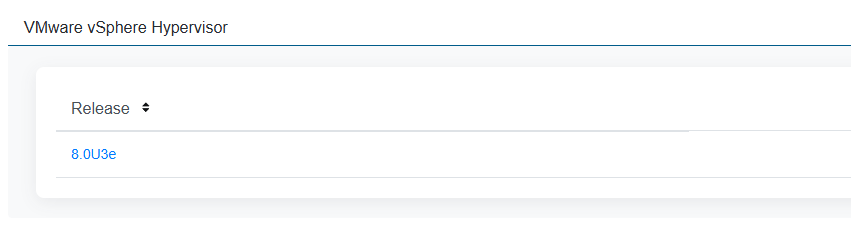
In the Free Downloads section, we can find VMware vSphere Hypervisor:
With the only one release available – 8.0U3e:
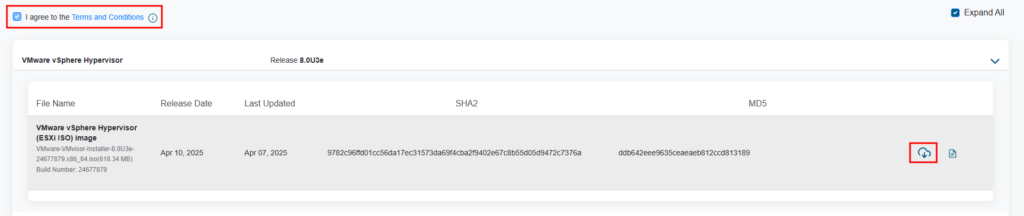
After reading and accepting terms and conditions, we can download the ISO:
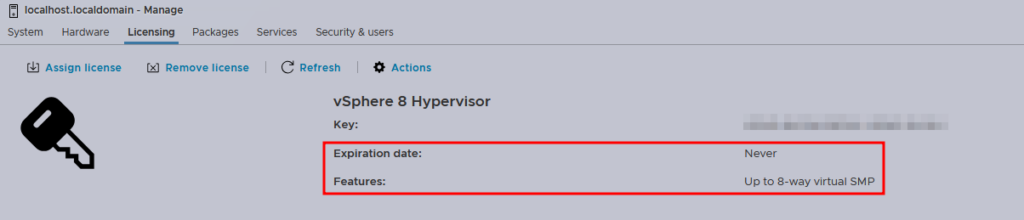
After installing, the first thing we want to see is the license:
We can see that the expiration date is set to never, and the host is limited to 8-way virtual SMP, meaning that you cannot power on the VM that contains more than 8 vCPUs.
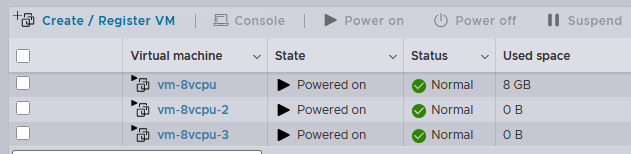
In the example above, you can see that I cannot power on a 16-vCPUs VM. However, I can power three VMs with 8 vCPUs each:
And this is the same way as it worked before. This is a suitable option for extra-small deployments, labs, and testing. For large environments, you should definitely consider purchasing VVF or VCF licenses.
Regarding the license key, you don’t need to get one as it was before. It is already installed in the ISO. According to the screenshots shared on Reddit, all downloads use the same key.
Nutanix released new minor versions of AOS, AHV, and PC with a few new features and many resolved issues in AOS, AHV, and Prism Central.
If you’re waiting for the first patch to upgrade your clusters to AOS 7 and PC 2024.3, make sure to read the release notes, resolved issues, and known issues. Maybe it’s time to upgrade.
For AOS 7.0.1 and AHV 10.0.1, there is a new feature: AMD Turin Processor Support – Starting with AOS 7.0.1, AOS supports nodes based on the AMD Turin processor, such as Nutanix G10 platforms. Currently, Nutanix has qualified the AMD Turin processor for Lenovo HX platforms.
For Prism Central 2024.3.1: There are few features related to NCM, but I want to highlight a new and highly anticipated feature called Power Monitor – Starting with pc.2024.3.1, you can gain insights into the power consumption of your IT infrastructure by enabling the Power Monitor feature. Power Monitor collects real-time power usage data at the node and cluster levels and displays this historical data as line charts on the Prism Central dashboard.
You can read more on how Prowe Usage works in the documentation.
Nutanix Certified Professional – Cloud Native (NCP-CN)6.10 is ready to leave the beta state and exam is now open for scheduling with exam appointments starting on Tuesday, April 22
For those, who do not know, what NCP-CN is, it is the certification that measures your ability to deploy, configure, optimize, and perform administrative tasks on a Nutanix Kubernetes Platform (NKP).
The best way to start preparing is to check the blueprint guide. You can find the blueprint guide here.
To schedule the exam, use the My Certification section on Nutanix University. Next, find the Nutanix Certified Professional – Cloud Native 6.10 certification and click schedule. You will be forwarded to the PSI page, where you can select a suitable date and time.
In addition, I highly recommend checking the Nutanix Kubernetes Platform Administration (NKAP) free online course to get the knowledge on the NKP solution. Also, if you have an opportunity, I recommend visiting this course live, because it includes a lot of hands-on labs, and it really can boost your knowledge on NKP, especially if you have a poor practice experience.
Veeam released the new version of Backup and Replication software 12.3.1.1139, which includes new features and addresses major security vulnerabilities.
First is CVE-2025-23120 with the critical severity level (9.9 score) – A vulnerability allowing remote code execution (RCE) by authenticated domain users.
This vulnerability only affects domain-joined backup servers, which is against best practices, by the way.
This issue affects Veeam Backup & Replication 12.3.0.310 and all earlier v12 builds. Consider updating ASAP.
Now let’s move to the new features and fixes. I will not show everything, because the list is too big, but I will point out a few I really love.
Platform support:
VMware vSphere 9.0 readiness. The official support will be confirmed with the full testing of the GA build when it becomes available. This means that after vSphere 9.0 is out, it is better to wait for Veeam to officially support this release before upgrading the vSphere environment.
Nutanix AHV – Removed the experimental support designation for malware detection, guest file indexing, and application-aware processing, except database log file shipping, which will still be considered experimental.
Proxmox VE – Updated ProxmoxVE plug-in enables the usage of non-root users to register Proxmox, support for Open vSwitch (OVS) networking, Object Storage API (SOSAPI), Nested Pools for backup jobs scope, and brings further backup performance improvements.
Enhancements:
One I really love for vSphere is – Instant VM Recovery engine improvements deliver a 5x increased number of simultaneous instant VM recoveries: up to 1000 VMs per backup server and up to 200 VMs per vPowerNFS server.
TLS connection support for the PostgreSQLconfiguration database has been added for improved security when hosting the database on an external server.
New ISO-based update distribution reduces downtime by accelerating update installation and eliminates the additional disk space requirement on the backup server, which was previously needed for unpacking the update before its installation.
New REST API capabilities include changing existing password records, rescanning all backup repository types, downloading metadata for Unstructured Data backups, and performing backup deletion.
New PowerShell capabilities include connection to Veeam Vaults, querying, and restoring protected Microsoft Entra ID conditional access policies.
There are more than 40 additional features, enhancements, and resolved issues, make sure you read the corresponding KB.
In addition, consider updating ASAP if CVE-2025-23120 addresses your installation.
Update: The NCP-US and NCP-DB beta exams have reached capacity and are now closed.
The year begins with the updated Nutanix certifications! Nutanix Certified Professional – Unified Storage (NCP-US) and Nutanix Certified Professional – Database Management (NCP-DB) were updated to version 6.10.
Nutanix Certified Professional – Unified Storage (NCP-US) – certification related to the Nutanix Storage Services: Files, Objects, and Volumes. Blueprint Guide; Nutanix Certified Professional – Database Management (NCP-DB) – as you can guess from the name, the certification is all about Nutanix Database Services (former ERA). Blueprint Guide.
As usual, both exams are in a beta state and available totally free for the first 250 participants; just use the discounts during checkout: NCPDB610BETA for NCP-DB and NCPUS610BETA for NCP-US exam. You can find those certifications on the PSI cert lists. The last test date to test is March 2, 2025.
Nutanix released a new anticipated training and certification related to the Nutanix Kubernetes Platform, or NKP.
First, the new course, Nutanix Kubernetes Platform Administration (NKPA), is available for free online at Nutanix University! The course is based on AOS 6.10, Prism Central 2024.2, and Nutanix Kubernetes Platform 2.12, and teaches you how to deploy, configure, and manage the Nutanix Kubernetes Platform (NKP).
For now, the certification is in a beta state and available totally free for the first 250 participants, just use the discount during checkout: NCPCN610BETA. You can find this certification on the PSI certs lists. The first test date is January 28, 2025, and you have time to prepare. The last test date is March 10, 2025.
Keep in mind, that during the beta state, you won’t get your results immediately after completing the exam. Usually, it takes a month or two after beta is over, and I can guess that the results of the exam could be at the end of April or in May.
New major versions of Nutanix AOS and AHV were released with a lot of new features. In addition to those major releases, a new version of Prism Central pc.2024.3 was also released.
AOS 7.0:
Cloud KMS support;
Optionally Disable CPU Hotplug on VMs – Check the documentation, and why it can be important;
Optionally Disable the SCSI Controller on VMs;
NVMe Software Serviceability;
One Node and One Disk (1N&1D) Cluster Fault Tolerance – I recommend to read more about this feature in the documentation;
Increased Maximum Supported Memory on AHV Hosts up to 8TB – By the way, you can find configuration maximums here;
Support for Flow Network Security Next-Gen with vLAN Policy Scope in Nutanix Disaster Recovery;
Cloud KMS Support;
Revamped Tasks Dashboard;
Centralized Password Management for AHV System Accounts;
Metro Availability with Nutanix Witness Service out of the Prism Central Instance: Automated Recovery of VMs and Volume Groups on Cluster Failure Across Prism Central Instances;
Multicloud Snapshot Technology (MST) DR with Zero Compute Deployment;
Node Maintenance Mode Management from Prism Central;
Protection and Recovery Scale Improvements for Nutanix Disaster Recovery;
Support for Flow Network Security Next-Gen in Nutanix Disaster Recovery ;(Clusters Registered to the Same Prism Central Instance)
You may have noticed that I didn’t mention the release type, STS or LTS. This is because the release model since AOS 7.0 has been changed and is now called the Unified ‘NCI Release Model’.
And this is not just a naming change, I recommend reading more here.
With the beginning of AOS 7.0, the new support cycle for release is 15 months of maintenance from GA, followed by 9 months of Support and we can expect two Unified releases per year.
Please note, that AOS 6.8 (eSTS) and AOS 6.10 (LTS) are under the Legacy Release Model and the End of Maintenance (EOM) and End of Support Life (EOSL) for AOS 6.10.x and pc.2024.2.x have been extended to align with the new NCI Release Model.